Wednesday, September 18, 2019
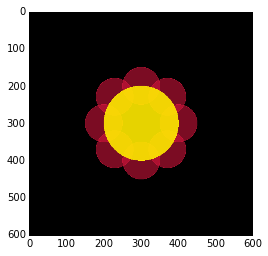
Voronoi Mandalas
The above was generated by this code:
I started with Carlos Focil's mandalapy code, modifying the parameters until I had a design I liked. I decided to make the Voronoi diagram show both points and vertices, and I gave it an equal aspect ratio. Carlos' mandalapy code is a port of Antonio Sánchez Chinchón's inspiring work drawing mandalas with R, using the deldir library to plot Voronoi tesselations.
Thursday, April 28, 2016
Lazy Evaluation and SQL Queries in the Django Shell
This means that even if it takes you a few lines of code to chain multiple queries, the Django ORM combines them into a single query. Less queries mean your database doesn't have to work as hard, and your website runs faster.
Evaluating a QuerySet Repeatedly
Imagine that we work for Häagen-Dazs and have access to their Django shell. We can use this to our advantage by hunting for free ice cream promotions.Here, we get the active Promo objects. We evaluate the results just to see what promos are available. Then we filter them on the word free.
>>> results = Promo.objects.active() >>> results [<Promo: Free Flavors on Your Birthday>, <Promo: 10% Off All Cones>, <Promo: Buy 1, Get 1 Free>] >>> results = results.filter( >>> Q(name__istartswith='free') | >>> Q(description__icontains='free') >>> ) >>> results [<Promo: Free Flavors on Your Birthday>]
The queries generated by the above are:
from django.db import connection >>> connection.queries [ {'sql': 'SELECT "flavors_promo"."id", "flavors_promo"."name", "flavors_promo"."description", "flavors_promo"."status" FROM "flavors_promo" WHERE "flavors_promo"."status" = \'active\' LIMIT 21', 'time': '0.000'}, {'sql': 'SELECT "flavors_promo"."id", "flavors_promo"."name", "flavors_promo"."description", "flavors_promo"."status" FROM "flavors_promo" WHERE ("flavors_promo"."status" = \'active\' AND ("flavors_promo"."name" LIKE \'free%\' ESCAPE \'\\\' OR "flavors_promo"."description" LIKE \'%free%\' ESCAPE \'\\\')) LIMIT 21', 'time': '0.001'}]
There are 2 queries because we evaluated the results twice.
The first query was from the first time we retrieved all the active promos. It's pretty short. It just selects Promo records where promo.status is active.
The second query was from the second time we evaluated results, after we filtered for "free" in the promo names and descriptions.
As a side note, there is a bit of extra work in the second query as the second query still has that WHERE 'flavors_promo'.'status' = 'active' part. One might expect filter() to simply filter on the already-retrieved results rather than hitting the database again. But that's alright because the extra time is negligible.
Before we move on, let's reset the list of queries:
>>> from django.db import reset_queries >>> reset_queries()
Evaluating a QuerySet Once
Now, let's look at what the queries would be if we only evaluated the results QuerySet once. Let's try building the same QuerySet again. Oh wait, just for fun, let's chain another operation so that we can be really sure that lazy evaluation is happening.>>> results = Promo.objects.active() >>> results = results.filter( ... Q(name__istartswith=name) | ... Q(description__icontains=name) ... ) >>> results = results.exclude(status='melted') >>> results [<Promo: Free Flavors on Your Birthday>]
As you can see, there's only one query:
>>> connection.queries [{'sql': 'SELECT "flavors_promo"."id", "flavors_promo"."name", "flavors_promo"."description", "flavors_promo"."status" FROM "flavors_promo" WHERE ("flavors_promo"."status" = \'active\' AND ("flavors_promo"."name" LIKE \'free%\' ESCAPE \'\\\' OR "flavors_promo"."description" LIKE \'%free%\' ESCAPE \'\\\') AND NOT ("flavors_promo"."status" = \'melted\')) LIMIT 21', 'time': '0.001'}]
Thanks to lazy evaluation, only one query was constructed, despite chaining multiple operations. That was nice.
Sure, the query could have been more optimal without the AND NOT melted part, but arguably that wasn't Django's fault, it was mine. But it gives me a clue about which operation I didn't need to chain in the Python code.
Next Steps
Try this on one of your projects. Open the Django shell, then try out some queries and see how they are evaluated. In particular, look at queries from one of your slower views.You can also do similar things with Django Debug Toolbar. However, in the shell you can dissect your Python code line by line, which can be very helpful.
Monday, November 9, 2015
Solving UnicodeDecodeErrors Due to Opening Binary Files
Common Scenario: Walking Directory Tree and Opening Files
A common thing to do in Python is to go through a directory tree, opening each file and doing something with the file's text.for path in paths: for line in open(path, 'r'): # Do something with each line of the file here. # Go ahead, right inside the for loop. # It's a text file, so imagine the possibilities.
Here, we iterate over all the paths in the directory tree. For each path, we open the file for reading. Then we go through each line of the file and do something with it.
The Problem
This works well enough for many situations, but at some point you end up running into a UnicodeDecodeError when you try to open a particular file. Usually, it's because that file isn't a text file: for example, it might be a JPEG or a font file.Those errors are scary! They look like this:
for line in open(path, 'r'): _ _ _ _ _ _ _ _ _ _ _ _ _ _ _ _ _ _ _ _ _ _ _ _ _ _ _ _ _ _ _ _ _ _ _ _ _ _ _ _ _ _ _ _ _ _ _ _ _ _ _ _ _ _ _ _ _ _ _ _ _ _ _ _ _ _ _ _ _ _ _ _ _ _ _ _ _ _ _ _ _ _ _ _ _ _ _ _ _ _ _ _ _ _ _ self = <encodings.utf_8.IncrementalDecoder object at 0x10349a320> input = b"\x00\x00\x01\x00\x02\x00 \x00\x00\x01\x00 \x00(\x10\x00\x00&\x00\x00\x00\x10\x10\x00\x00\x01\x00 \x00(\x04\x00\x00N...00\x00\x00\x00\x00\x00\x00\x00\x00\x00\x00\x00\x00\x00\x00\x00\x00\x00\x00\x00\x00\x00\x00\x00\x00\x00\x00\x00\x00\x00" final = False def decode(self, input, final=False): # decode input (taking the buffer into account) data = self.buffer + input > (result, consumed) = self._buffer_decode(data, self.errors, final) E UnicodeDecodeError: 'utf-8' codec can't decode byte 0xad in position 89: invalid start byte
Before you go into a UnicodeDecodePanic trying out all the variants of open, io.open, unicode_open, etc., think about whether the file you're trying to open is even a text file.
The Solution
To solve the problem of accidentally opening non-text files, you can use BinaryOrNot's is_binary function. Just check to make sure the file isn't a binary before attempting to open it, like this:from binaryornot.check import is_binary for path in paths: if not is_binary(path): for line in open(path, 'r'): # Do something with each line of the file here. # Go ahead, right inside the for loop. # It's a text file, so imagine the possibilities.
This is a real-life code example. In fact, it comes from a fix to cookiecutter-django's tests that I just committed this weekend, which comes from Cookiecutter core code.
BinaryOrNot is a package that guesses whether a file is binary or text. I put it together a couple of years ago in order to use it in Cookiecutter. Since then, I've found uses for it over and over in various projects.
More Info
BinaryOrNot on GitHub: https://github.com/audreyr/binaryornotProject documentation: http://binaryornot.readthedocs.org/
Tuesday, November 3, 2015
Intensive Django Training With the 91st Cyberspace Operations Squadron
We prepared a customized version of our curriculum to meet the needs of the 91st Cyberspace Operations Squadron of the US Air Force.
Teaching such a sharp, enthusiastic group and seeing everyone grasp difficult concepts so rapidly was a huge thrill. As instructors who like challenges, we tend to err on the side of assuming that our students can handle anything, so we threw a lot of very advanced topics at the group, wondering how much would click. On the last day as they were putting their knowledge into practice during hands-on project time, it was apparent that even the hardest parts had made an imprint.
For more info, see Intensive Django Training with the US Air Force, Daniel's detailed blog post about the training experience.
Special thanks to Capt. Jonathan D. Miller for making this possible. It was an honor to work with you and your team.
Tuesday, May 26, 2015
Our Trip to DjangoGirls Ensenada, Mexico
This weekend, Daniel and I drove down to Ensenada, Mexico to speak and coach at DjangoGirls Ensenada. It was a 2-day workshop for women of any level of experience to get a taste of web application development.
A photo posted by Audrey Roy Greenfeld (@pyaudrey) on
The event was organized by DjangoGirlsMX with the help of the US Consulate General of Tijuana and the non-profit Hala Ken.
We asked the US Consulate and Hala Ken about why they decided to get involved. They answered that Django Girls workshops fit perfectly into two of their major areas of interest: new technology and women's empowerment.
We were honored to be invited as guest speakers and appreciative of the opportunity, knowing that we could make a big difference showing women new to Django that we cared.
¡Como invitados especiales tendremos a @audreyr y @pydanny! :D #DjangoGirls #MondayMotivation pic.twitter.com/74rFq7DXEN
— DjangoGirls Ensenada (@DjangoGirlsMX) April 20, 2015
At the end of the morning session, we gave a talk to inspire attendees to keep going with their programming journey. It was called "Programming Gives You Superpowers." Here are the slides.
Note: for fun we made the cover image a little fancier after the talk, otherwise it's the same :)
It was a fantastic experience getting to spend time with the web development community of Tijuana/Ensenada. So many of the Python Tijuana and Django Girls Tijuana organizers and members drove out to Ensenada and spent the night in hotels to help make this happen. We had fun coaching alongside them after our talk.
My co-author, co-presenter, co-everything husband PyDanny also blogged his account of it: My First Django Girls Event
Finally, we had such a great time that we're now working on planning an upcoming Inland Empire DjangoGirls/RailsGirls event. All are invited to help: RSVP here or here for the May 30 planning session.
Sunday, May 3, 2015
Two Scoops of Django 1.8 is out!
The book is now available as a PDF. I know this will make a lot of folks happy! The print paperback is coming soon (US and India editions to start).
More info: http://twoscoopspress.org/products/two-scoops-of-django-1-8
I wrote half the book, including some of the rather difficult parts :) I also did the illustrations. The book is filled with a ton of weird cartoons and silly humor.
Enjoy, and hope it's helpful!
Sunday, April 12, 2015
Spring Cleaning for Python Programmers
Instructions:
1. Add these lines to your .bashrc (or other shell rc) file:
alias rmpyc='find . -type f -name "*.pyc" -print -delete' export PYTHONDONTWRITEBYTECODE=true
The first part gives you a handy rmpyc command to recursively delete .pyc files.
The second part tells Python not to write .pyc files anymore.
2. Source your rc file and run rmpyc from your home directory (on UNIX, from ~). This will delete all the Python bytecode from your home dir onward. You don't need to keep it around because it'll just get rewritten as needed anyway.
3. Delete the virtualenvs that you're not using. (e.g. if you use virtualenvwrapper, delete the directories in ~/.virtualenvs/ that you don't need).
4. If you use VirtualBox, delete the virtual machines that you don't need.
5. Delete the repos that you don't need around anymore.
In my case I freed up 3 GB by removing the .pyc files and 25 GB by removing the virtual machines. I forgot to check how much space my unused virtualenvs took up, but it was probably a non-trivial amount.
My numbers are probably higher than most because my laptop's almost 5 years old and I mess around with random Python packages a lot, but you should still be able to save some space. At the very least, it'll be like squeezing the last paste out of a toothpaste tube.
Note: originally the instructions said the following, but I updated them after advice from Dan Crosta, Glyph, and Kit. Thank you all so much for the tips!
alias rmpyc='find . -type f -name "*.pyc" -print0 | xargs -0 rm -v'
Tuesday, March 24, 2015
Pillow Flowers
The trick to drawing flowers is to iterate around the petals in polar coordinates, and then convert polar to cartesian for drawing purposes.

I demoed some of this at the meetup that I hosted last night, Inland Empire Pyladies' Coding for Artists. There, Danny and I taught participants how to use Pillow, ellipses, rectangles, random number generation, and trigonometry to make basic 2D generative art.
Friday, March 6, 2015
Compressing PDF Files at the Command Line
![]() |
| You might remember Ghostscript from your college days. It's one of those old school things that's still awesome. |
ps2pdf
The command-line tool ps2pdf converts .ps files (Postscript) to .pdf using Ghostscript. But you can also pass in a PDF file as input.If you have Ghostscript installed, you can type this at the command line:
ps2pdf -dPDFSETTINGS=/ebook in.pdf out.pdf
The /ebook setting "selects medium-resolution output similar to the Acrobat Distiller "eBook" setting," which sounds good for documents that need to be screen-readable.
Read more on StackOverflow about what else you can pass into PDFSETTINGS.
Color to Grayscale
gs -sDEVICE=pdfwrite -sProcessColorModel=DeviceGray -sColorConversionStrategy=Gray -dOverrideICC -o out.pdf -f in.pdf
Here, in.pdf is your input file, and out.pdf is your output file.
Did It Work?
The easiest way to tell if it worked is to list the files in the current directory by size:ls -sS
Compare the size of the input PDF with the output PDF. The output PDF should be smaller, of course.
Other Tools
pdfsizeopt
I always start out by trying to find a Python solution to problems, because then whatever I find becomes a handy little building block for me to use in other Python projects.
Before trying either of the above, I attempted to compress the PDF files with the Python library pdfsizeopt. However, I ran into this error:
error: Multivalent.jar not found. Make sure it is on the $PATH, or it is one of the files on the $CLASSPATH.
I resolved that error by finding the latest Multivalent jar file on the official project page and putting it on my $PATH, but then I got this error:
AssertionError: Multivalent failed (status)
At that point I moved on. That said, if anyone knows how to get around that second error, I'd love to know. It would be great to get pdfsizeopt working.
Shrinkpdf
I also tried out Alfred Klomp's nice shrinkpdf.sh script. If you try it out, experiment with the resolution and the other parameters. (This is actually how I ended up with my color to grayscale solution above.) Study it and play around until you're satisfied with the output.
Monday, February 23, 2015
Recap: Python and Pyladies at SCALE13x
The Python and Pyladies community booths were side-by-side, with both booths representing members of various Python and Pyladies user groups throughout Southern California.
I spent most of my time on the left side of the Pyladies booth, while Daniel was next door on the right side of the Python booth. Sometimes we crossed over into the opposite booths :)
![]() |
| Audrey and Daniel |
![]() |
| Esther of Pyladies LA & Burbank, Audrey and Tiffany of Inland Empire Pyladies |
![]() |
| Audrey and Daniel (that's us!), Debra, and Carol (San Diego Pyladies co-organizer). |
Special thanks to goodwill for organizing the Python booth, and to Carol Willing for organizing the Pyladies booth.
Saturday, January 3, 2015
How to Add Syntax-Highlighted Code Snippets to Blog Posts
- The tool must not require me to embed a third-party widget into my blog post. That rules out Github Gists.
- The tool must not require me to make changes to my main blog template, especially not changes that load any additional files. That rules out SyntaxHighlighter.
I found a tool called hilite.me by Alexander Kojevnikov which met the above criteria. It's pretty awesome:
Now, adding code blocks to blog posts is easy:
- Paste your source code into the left box
- Click Highlight!
- Copy the generated HTML/CSS code into the HTML for your blog post. (For example, if you're on Blogger, click HTML next to Compose and then paste the code into its place.)
- Preview and edit to make sure that the in-between whitespace looks decent.
Sunday, December 14, 2014
Customizing the Bash Prompt to Be More Romantic
happycode:open-source-repos audreyr$
To get this, I had this line in my .bashrc file:
1 2 | # Bash prompt displays the hostname, current directory name, username PS1="\h:\W \u\$" |
But I eventually grew tired of seeing all that useful information, as it made my prompt too long. It was time for a change.
I thought about what I wanted to be reminded of every time I opened my terminal. Something happy, I thought. The happiest thing is love.
So I changed it to this:
1 2 | # More romantic bash prompt. PS1="\W a♥d " |
That's short for Audrey ♥ Daniel, of course.
You can use other Unicode symbols in your Bash prompt to jazz it up, like happy faces and flowers. See this post on the Unix StackExchange about someone with an awesome ★ in their prompt.
Monday, September 15, 2014
Free Intro to Python Workshop in San Diego on Sat, Sept 20
Saturday, September 20, 2014
9:30am-4pm
Ansir Innovation Center, San Diego, CA
As a woman programmer, I encourage more women to sign up and fill the remaining spaces! There are still spaces available through Inland Empire Pyladies and San Diego Pyladies. RSVP through the Pyladies chapter closest to you:
- http://www.meetup.com/iepyladies/events/202775112/
- http://www.meetup.com/sd-pyladies/events/199295472/
This is a joint event between San Diego Python/Pyladies and Inland Empire Python/Pyladies. It is also affiliated with OpenHatch and sponsored by the Python Software Foundation.
Saturday, April 26, 2014
jQuery MessageBar: A Top Bar For Notifications
One of the fruits of this effort was a jQuery plugin called MessageBar. Here's what it looks like when it shows up on Django Packages:
| jQuery MessageBar, as seen at the top of Django Packages |
Consider this a gift to the front-end developer community. It is free and open-source, available on GitHub: https://github.com/audreyr/messagebar
It works particularly nicely with Django's messages framework, but Django isn't required. It's just HTML, CSS, and JS. Therefore, it would work just fine with any PHP or Ruby site, for example.
Friday, February 28, 2014
Cookiecutter Hits 704 Stars on GitHub
In case you aren't familiar with it, Cookiecutter is a utility for generating projects from project templates. It is language-agnostic, and there are boilerplate templates for HTML, JS, C, Python, Django, LaTeX, Common Lisp, and other types of projects.
Development Continues
Slowly but surely, I have been working through the queue of pull requests for Cookiecutter and cookiecutter-pypackage. Reviewing pull requests takes time because:- Every patch must be carefully reviewed for cross-platform compatibility (Windows, Linux, Mac).
- Once a patch goes in, it's in the codebase forever. Each line of code requires thoughtful consideration.
- Contributors to Cookiecutter are generally very experienced programmers that push the limits of my knowledge.
- To meet my standards, each patch typically requires hours of coding on my part. This is to fix cross-platform issues, cross-Python-version compatibility issues, ensure uniform coding style, hunt down any edge cases that may have been missed, etc. It's a labor of love.
Sponsorship Opportunity
If your company uses Cookiecutter, consider sponsoring the project. Benefits include:- Advertising and exposure on the Cookiecutter README and the documentation homepage.
- Extra attention given to issues/pull requests from your company's developers.
- Additional development work on Cookiecutter, focused on your company's needs.
- The gratification of giving back to open source, and full bragging rights. This makes for great company PR.
- Mentions of your company on future blog posts about Cookiecutter, in the release notes, and more.
Thursday, February 20, 2014
Art Donated to PyCon Philippines
I hand-painted this art print in watercolor, which will be raffled off as a prize at PyCon Philippines 2014. The painting shows the various logging levels, as applied to ice cream.
See a larger photo here.
This was part of Two Scoops Press' in-kind conference sponsorship package for PyCon Philippines.
Cheers and Congratulations
I can't even begin to express how thrilled I am about the growth and success of PyCon Philippines.My mother was born and raised in the Philippines, and I lived there for part of my childhood. I still visit family in the Philippines often. I am very proud to consider myself a part of the technical community there.
As a past co-organizer who worked like crazy in 2012 creating and managing the previous PyCon PH website, doing PR, running the live coverage Twitter stream, and helping with sponsorships, I know how hard the organizing team is working and salute your efforts.
In particular, special shout-outs to these PyCon PH & Python community leaders:
- Sony Valdez, Conference Chair
- Andrew Paulo Robillo, Ralph Vincent Regalado and Briane Paul Samson
- Mark Steve Samson and Chad Estioco
- Matt Lebrun and Micaela Reyes
- Frank and Ann Pohlmann, for passing the torch after chairing PyCon PH 2012
Wednesday, February 12, 2014
Two Scoops of Django 1.6 is a #1 Python Bestseller
Bestseller Status
We made it as a #1 bestseller in the Programming and in the Python categories on Amazon. The 1.6 edition is still a "#1 Python Bestseller" as of now:![]() |
| Screenshot from Amazon showing our book as a #1 Python bestseller. |
At one point, it even ranked #33 overall in Amazon's entire Education & Reference Books category. This is what happens when you write thoughtfully, with careful attention to detail, and with strong intentions to create a truly helpful reference book.
Huge Thank You to Supporters
Response from buyers of the 1.6 edition has been overwhelmingly positive and glowing. We are getting your emails and messages, and they really touch our hearts and mean a lot to us. We released the 1.5 edition over a year ago. The 1.6 edition took several additional months of work. The positive response from readers is what has made all of our effort worthwhile. Special thanks to all who reviewed the book on Amazon.com and other international Amazon sites.Autographed Copies
Last week, we autographed around 50 copies and mailed them out around the world. This was a lot of fun. Some of the copies may be autographed a bit wildly, with completely wacky humor. We got a bit carried away, doing our best to put a lot of thought and care into sending each package. For anyone who didn't get an autographed copy:- We are waiting for another shipment of books to arrive on our doorstep. Once it arrives, we'll have more available through twoscoopspress.org.
- We're also happy to autograph books in person. We won't be able to make it to conferences this year, but we're thinking of doing a road trip at some point and might visit some user groups.
The Last of the Series
As we mentioned, the 1.6 edition is the last Two Scoops of Django book that we will ever create. It is a major expansion and rewrite of the book, with countless tips from readers incorporated into the material. It was a major effort, and we are incredibly proud of the results. But we are tired now, and we are done. Our time has come to move on to other great things.Our Long History of Listening to Feedback
We have updated the FAQ again with more answers to common questions. To save us from typing and repetitive stress injury pain, please check there first if you have a common question or comment. Remember, we have a long, long history of always listening to reader feedback and trying our best, but that our physical and mental health, family, and work have to come first.We will continue to try our best, but please understand we're backlogged with work and family obligations (not to mention open source project maintenance obligations). Right now, getting our lives in order is our top priority.
Wednesday, December 4, 2013
Bad Python Jokes for the Holidays
What Christmas items can be used as context managers?
How do Python programmers make Hanukkah latkes?
Finally, a Hanukkah puzzle from PyDanny, who's really been getting into the holiday cheer:
Monday, December 2, 2013
The Python Indie Bundle
To celebrate Cyber Monday 2013, I've teamed up with Daniel Greenfeld and Matt Harrison to create the Python Indie Bundle.
![]() |
| Treading on Python volumes 1 and 2, and Two Scoops of Django 1.5. |
The set of 3 books normally costs $36.95 total, but for Cyber Monday we're offering it for $24.95. You can get it from Two Scoops Press here.
Wednesday, August 30, 2006
Hello world!
It will be full of everything that I like: clouds, rainbows, oranges, painting, sculpture, programming, Python, JavaScript, open source, design, travel, dogs, butterflies, cooking, baking, ice hockey, sewing, ice cream, and possibly even someone named Danny whom I haven't met yet.
But not yet.